 |
| Warfare Incorporated Forum Index » Strategy Center » |
| How to take screen shoots and uploading them, by NO@H |
| Author | Message | |
|---|---|---|
|
NO@H Established Forum User  Joined: 30 Nov 2010 Posts: 79 |
-All you have to do is press this button on your keyboard: 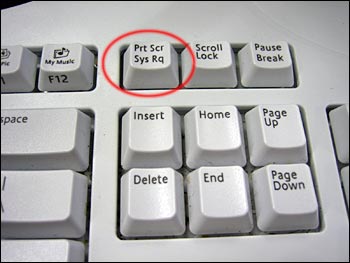 and paste it in paint. Save it. -Then to post the image on the forums, simpy upload it on a image hosting website. I like http://tinypic.com/ . Upload your phtot and copy the link with Taking ScreenShots:
-All you need to do is hold the home button and sleep button on your apple device at the same time for a second. The screen will flash and make a camera shot noise, You screenshot is now in your photo application.
Uploading ScreenShots:
-First plug your (ipod/iphone/ipad) into your computer using your USB connector.
-Second, after doing step one, you should see an options menu pop up on your screen
[img]http://i51.tinypic.com/bitk0o.png" alt="" class="postimg" loading="lazy" /> Any of these options will import pictures onto your computer but, if you want to upload only one, select the third option. To see your pictures: Internal storage/DCIM/800AAAAA and you should see all the images you have on the photo application on your apple device. this is wanderer editing this topic, i combined NO@H's two topics into one. and made it into an announcement. and changed the tittle of the topic. |
|
 Posted: Fri Jul 22, 2011 10:37 pm Post subject: How to take screen shoots and uploading them, by NO@H
| Back to top · Warfare Incorporated Forum Index |
Read-only historical archive — rebuilt from the original phpBB 2 database.
Forum software © 2001-2008 phpBB Group. Posts © their respective authors.
Warfare Incorporated © 2003-2026 Spiffcode, Inc.